Multi-Tenant Architecture
The Mentor platform has a multi-tenant architecture, and adopters can:
Set up the application using the microservices.
Create multiple organizations and assign administrators for each organization.
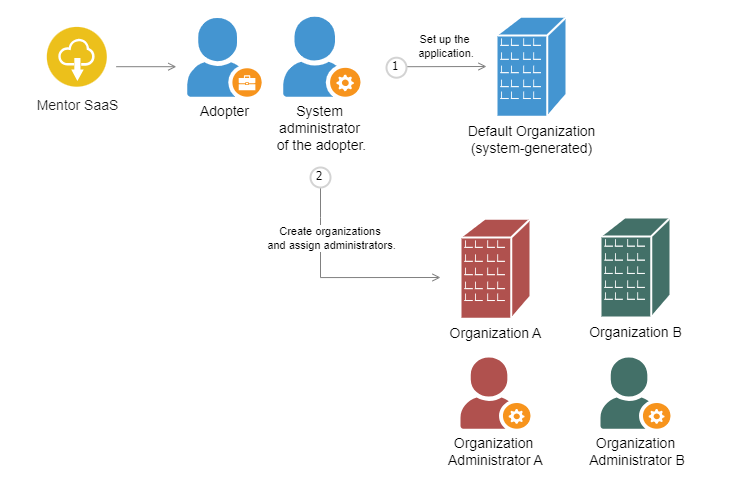
Default Organization
After setting up the application, a Default organization is created. Users who are not part of any organization are added to Default and the system administrator acts as the organization administrator.
See the following topics to learn more about the Organization Administrator role:
Assigning Users to Organizations
Users who sign up using a shared link are assigned a mentee (default) role. The mentee's organization is detected based on the organizational domain in the email ID.
If the organization uploads email IDs to the platform, the users would receive email invites. The administrator can pre-register email IDs that belong to corporate as well as public domains. After signing up, such users are detected as organizational users in the application.
After signing up, if the email ID is not registered by the organization or if it does not belong to the organizational domain, the user is added to the Default organization.
Policy Architecture
Organization administrators can use policies to manage access to mentees, mentors, and sessions across organizations.
To learn more about configuring policies for an organization, see Setting Policies for an Organization Using APIs.
| Types of Policies | Description |
|---|---|
| All | If the policy is set to All, the organization’s mentees, mentors, or sessions can be accessed by other organizations. Similarly, the organization’s users can access mentees, mentors, or sessions of other organizations. note Restrictions set by other organizations will be applicable for users. |
| Current | If the policy is set to Current, only users belonging to the organization can access the mentors, mentees, or sessions. Similarly, the organization’s users cannot access mentees, mentors, or sessions of other organizations. |
| Associated | The Associated policy provides users with access to mentors, mentees, or sessions across multiple organizations. For example, if organizations A and B are linked with the Associated policy, only users belonging to these two organizations can access the mentors, mentees, or sessions of both organizations. |